What Is the Difference Between a Traditional CMS and a Headless CMS?
Choosing a CMS may seem like a simple technical decision, but it directly affects how easily a business can manage content, launch new features, support multiple channels, and scale a digital product over time.
For a straightforward corporate website, a traditional CMS such as WordPress may be completely sufficient. Editors can create pages, update content, manage SEO settings, and publish changes from one place. However, the decision becomes more complex when the same content needs to appear not only on a website, but also in a mobile app, customer portal, product catalogue, or several regional interfaces. This is where the choice between a traditional CMS and a headless CMS becomes important.
Neither approach is universally better. The right solution depends on how the business publishes content today, how complex the frontend is, how many channels need the same data, and what the product is expected to become in the next few years.
What Is the Difference Between a Traditional CMS and a Headless CMS?
A traditional CMS combines content management, backend logic, templates, and website presentation in one system.
The structure usually looks like this:
Content Management → Backend → Templates → Website
An editor creates a page, adds images and text, chooses a layout, previews the result, and publishes it. The same system stores the content and controls how that content is rendered on the website. WordPress is one of the most familiar examples. In a typical WordPress setup, pages, blog posts, media, menus, templates, plugins, and frontend presentation are managed within one platform. A headless CMS separates content management from presentation.
Its structure is closer to:
Content Management → API → Website / Mobile App / Other Channels
The CMS stores and organizes the content, while a separate frontend requests that content through an API and decides how to display it.
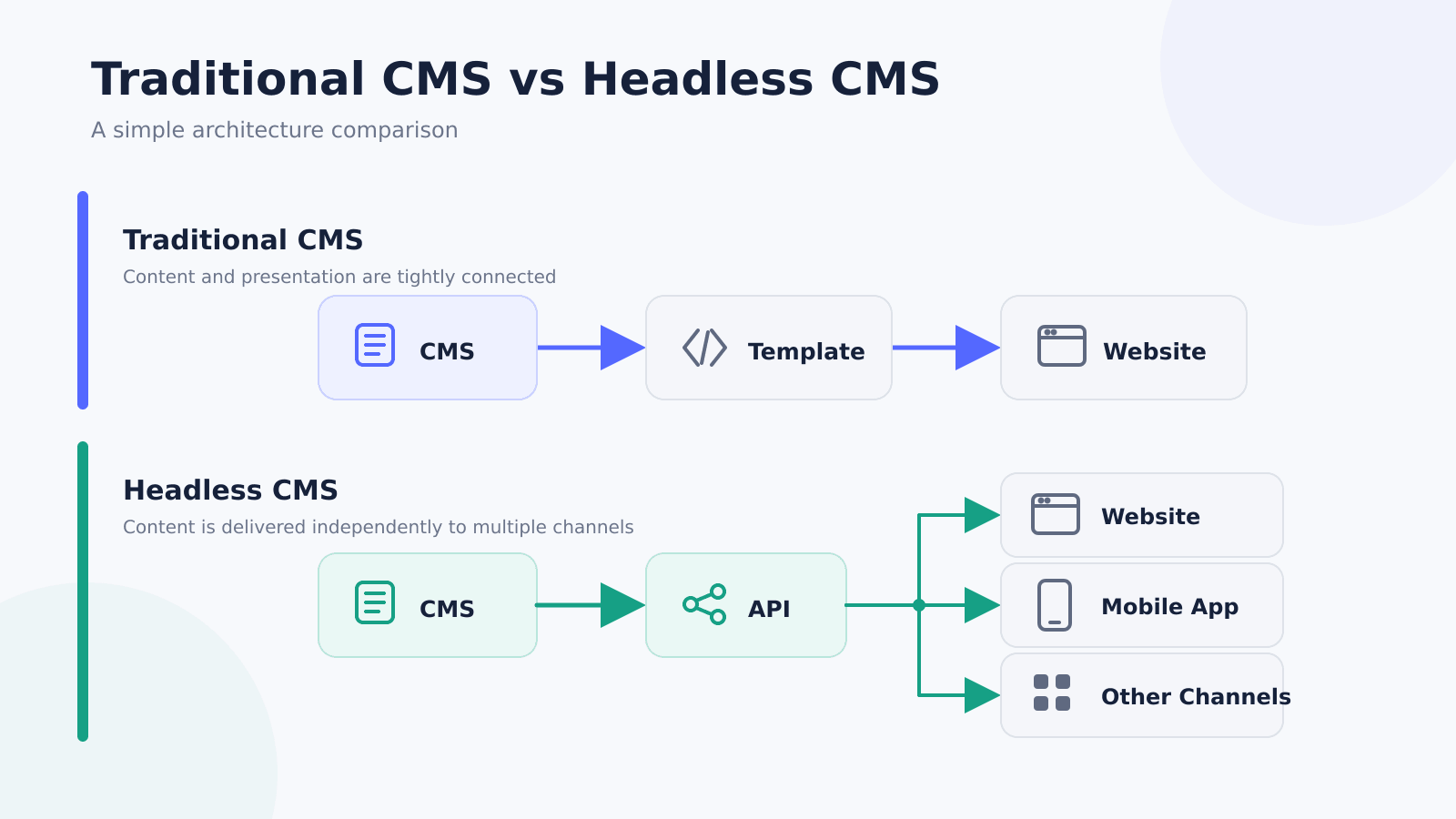 Traditional and headless CMS architectures mainly differ in how content is delivered to the frontend.
Imagine a healthcare company managing a service called “Laser Therapy.” In the CMS, the content manager can fill in fields such as title, description, price, image, and FAQ. With a traditional CMS, these fields usually belong to one website page and are rendered through the CMS theme. With a headless setup, the same structured data can be displayed on the website, inside an iOS or Android application, or in a customer portal. The content stays centralized, while each frontend can present it differently.
The key difference is therefore not the content itself. It is how tightly content management is connected to the presentation layer.
Why Quality Assurance Is the Unsung Hero of Web Development
Traditional CMS: When Simplicity Is an Advantage
Traditional e-commerce platforms are not outdated. For many business websites, they remain the most practical option because they remove technical layers that the project simply does not need.
Consider a company website with around 20–40 service pages, a blog, team profiles, several landing pages, contact forms, multilingual content, and basic CRM or analytics integrations. If all of this information is primarily consumed through one website, a traditional CMS can keep both development and content management straightforward.
A content manager can create a page, add text and images, preview the result, update SEO metadata, and publish it without depending on a developer for every small content change.
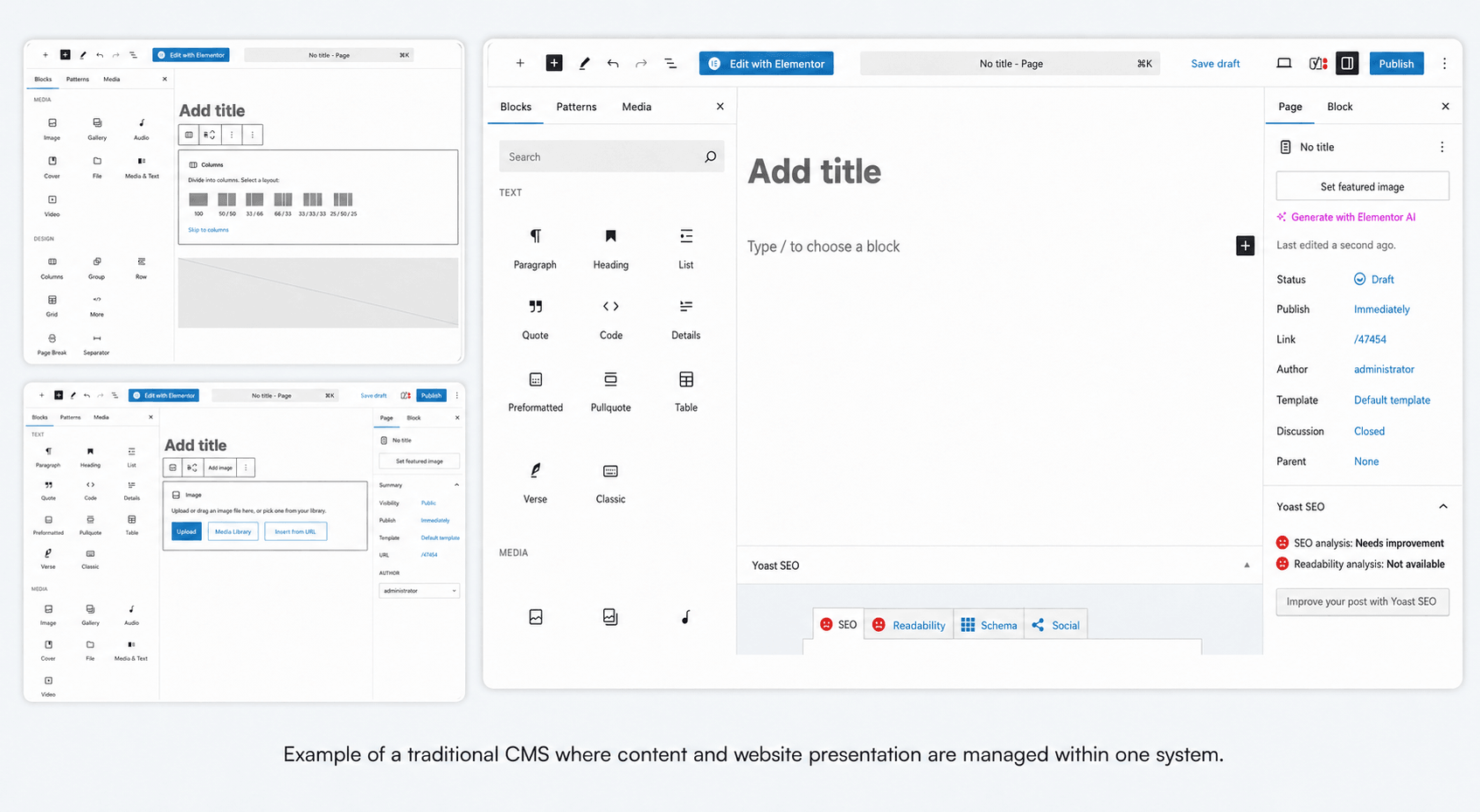
A traditional CMS allows editors to manage content and website presentation in the same environment.
The technical setup is also usually simpler. A traditional implementation may consist of a CMS, theme, and hosting. A headless implementation often adds a separate frontend application, API integration, frontend hosting, preview logic, and additional deployment processes.
Each new layer has to be developed, tested, deployed, monitored, and maintained.
For a small or medium-sized corporate website, this extra complexity may not create enough business value.
The limitations start to appear when the website is no longer the only destination for content. If a retailer later adds a mobile app and a B2B portal, the same product descriptions or guides may have to be copied between several systems. At that point, a more decoupled architecture can become useful.
When a Headless CMS Makes More Business Sense
Headless architecture becomes more relevant when content needs to work as structured business data rather than simply as pages.
One of the clearest examples is a company that serves several digital channels.
Suppose a retailer manages 600 products. Each product includes a name, description, category, specifications, images, instructions, related content, and FAQ. In a headless model, that information can be managed once and reused by several interfaces.
What are some top tools and technologies used in IT services?
A content manager updates the product description in one place, and both the website and mobile app receive the updated version through an API. This reduces duplicated work and lowers the risk of having different information in different products.
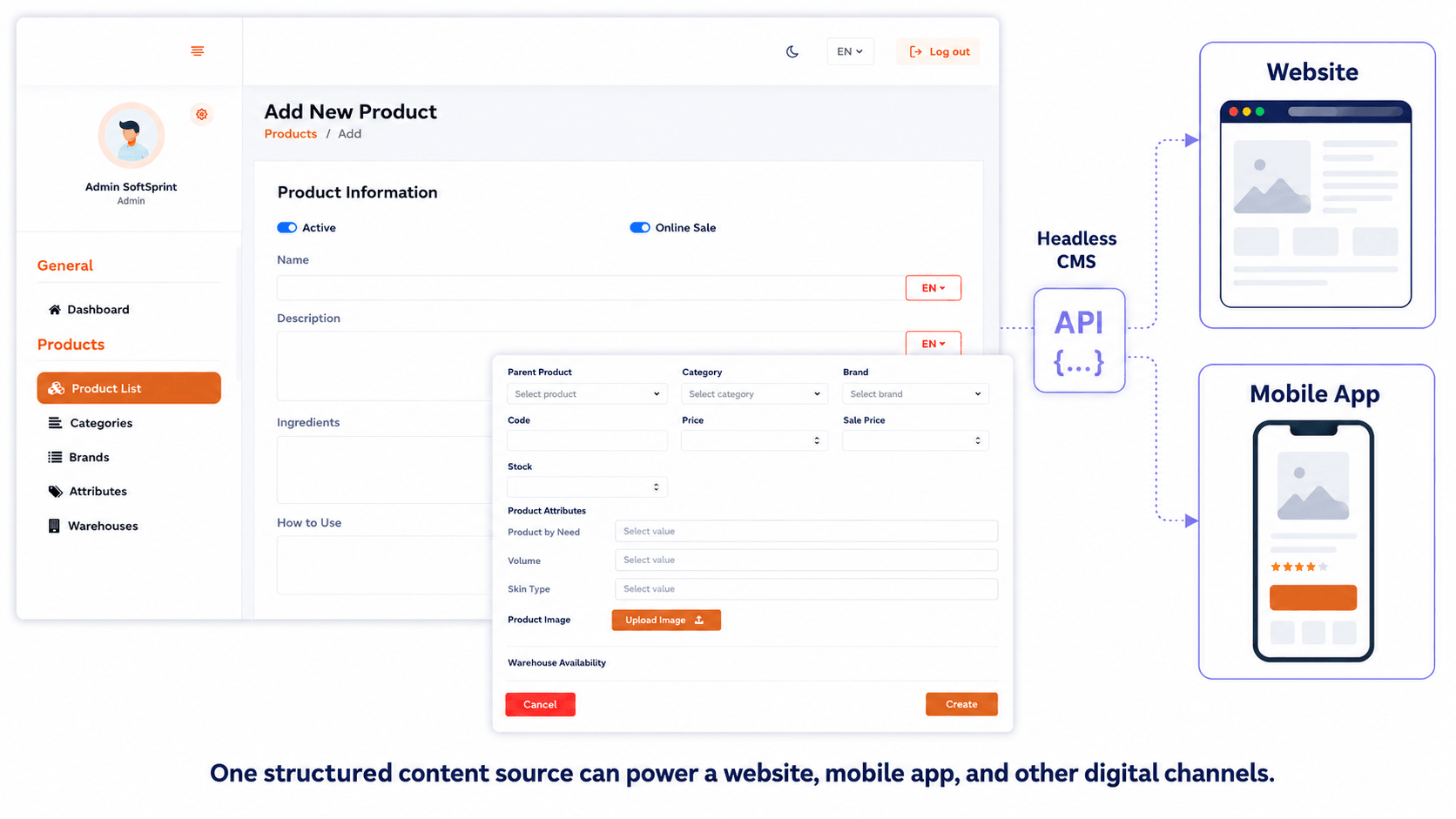
Structured content in a custom admin panel can be reused across several digital interfaces.
Headless can also make more sense when the frontend requires significant customization.
A standard marketing website usually fits well into a traditional CMS. But some websites behave more like applications. They may include user accounts, booking flows, advanced filters, dashboards, personalized content, third-party integrations, or real-time data.
In these cases, the CMS is only one part of a larger product. Separating the frontend gives developers more freedom to build custom interactions without being constrained by the structure of a traditional theme.
Another reason to consider headless is long-term product evolution.
A company may start with a website in 2026, redesign that website in 2027, and add a mobile application in 2028. With a properly structured content layer, the presentation can change while the underlying content model remains reusable.
That does not mean redesigns become free. Frontend development, integrations, testing, analytics, and SEO still require work. The advantage is that the content does not need to be rebuilt simply because the interface changes.
Which CMS Should You Choose?
A traditional CMS is usually the better fit when the primary goal is a corporate or marketing website, most content lives on one website, editors need simple page management, and custom frontend functionality is limited.
A headless CMS makes more sense when the same content needs to serve several products, when a website is connected to a mobile app or portal, when the frontend requires complex workflows, or when the product is expected to evolve significantly.
The architecture should follow actual business needs rather than technology trends.
Conclusion
There is no universally better CMS architecture. A simple business website should not become technically complex just because headless architecture is popular. At the same time, a growing digital platform should not be forced into a tightly coupled CMS if several products need to reuse the same structured data. The right decision depends on business workflows, content structure, integrations, number of digital channels, future plans, and maintenance budget.
If you are planning a new website or rebuilding an existing digital product, ELDEVELOP can help define the right architecture before development begins, from CMS-based business websites to custom web platforms.